> ## Documentation Index
> Fetch the complete documentation index at: https://mozdocs.mozartfintech.com/llms.txt
> Use this file to discover all available pages before exploring further.
# Autenticación
Algunos endpoints de la API están protegidos y, por lo tanto, requieren que te autentiques usando un token de API.
## Generar un token
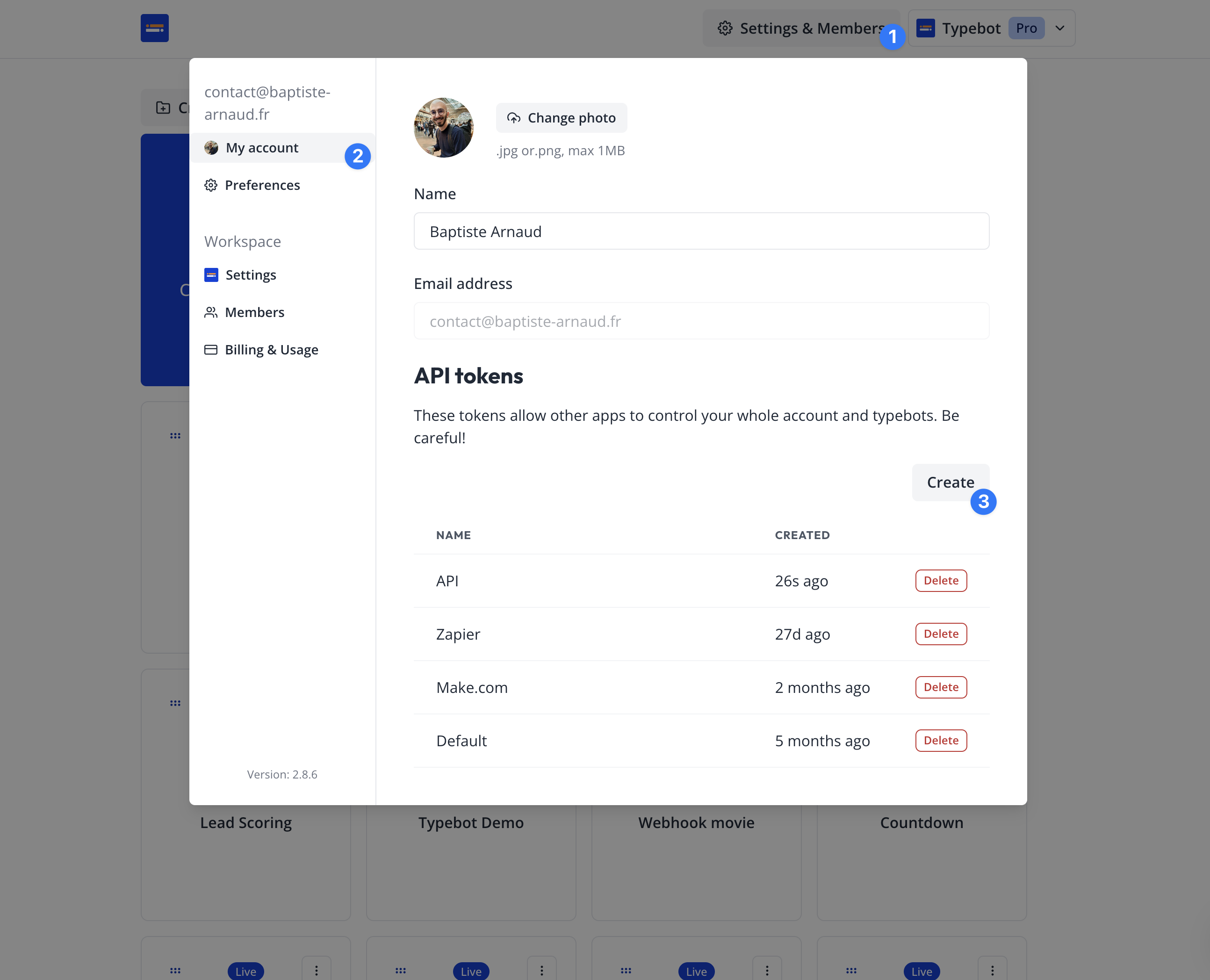
1. Navega a tu panel de mozbot ([https://mozbot.mozartfintech.com/mozbots](https://mozbot.mozartfintech.com/mozbots))
2. Haz clic en Configuración y Miembros > Mi cuenta
3. En la sección "Tokens de API", haz clic en "Crear"
4. Dale un nombre y luego haz clic en "Crear token"
5. Copia tu token.
 ## Usar tu token
Puedes autenticarte añadiendo un encabezado `Authorization` a todas tus llamadas HTTP. El encabezado Authorization se formatea de la siguiente manera: `Authorization: Bearer ` (reemplaza `` con tu token previamente generado).
Ejemplo:
```sh
curl -L -X GET 'https://mozbot.mozartfintech.com/api/mozbots/:mozbotId/results' \
-H 'Accept: application/json' \
-H 'Authorization: Bearer myAwesomeToken'
```
## Usar tu token
Puedes autenticarte añadiendo un encabezado `Authorization` a todas tus llamadas HTTP. El encabezado Authorization se formatea de la siguiente manera: `Authorization: Bearer ` (reemplaza `` con tu token previamente generado).
Ejemplo:
```sh
curl -L -X GET 'https://mozbot.mozartfintech.com/api/mozbots/:mozbotId/results' \
-H 'Accept: application/json' \
-H 'Authorization: Bearer myAwesomeToken'
```